

Simplify your texting programs with new Scale to Win features
2026 is gearing up to be a busy year. Whether you are supporting fundraising clients, scaling up your organization’s organizing programs, or running a campaign, we’re guessing you are short on time this year.
Simplify your texting campaigns and target your supporters more efficiently this year with the newest features from Scale to Win Text. From Audiences and saved searches to opt-in texting with long code and advanced reporting features, you will be ready to take on 2026 and everything it throws at you!
New major features include:
Audiences and Saved Searches: a feature that empowers organizations to build, manage, and message groups of contacts over time, allowing for highly targeted campaigns with longevity.
Opt-in texting with 10-DLC and toll-free numbers: Sending messages to opted-in contacts is not just for short code anymore! Build a list for a future short code or run your opt-in program through 10DLC or toll-free.
Advanced reporting features: With structured tags and campaign metadata, you can create sophisticated ways of tracking and reporting your data across your account
Other updates: click-to-links, Campaign Verify tokens for toll-free and short code, removing archived campaigns from the texter view, and area code filtering in Audiences.
Audiences and Saved Searches
What is it?
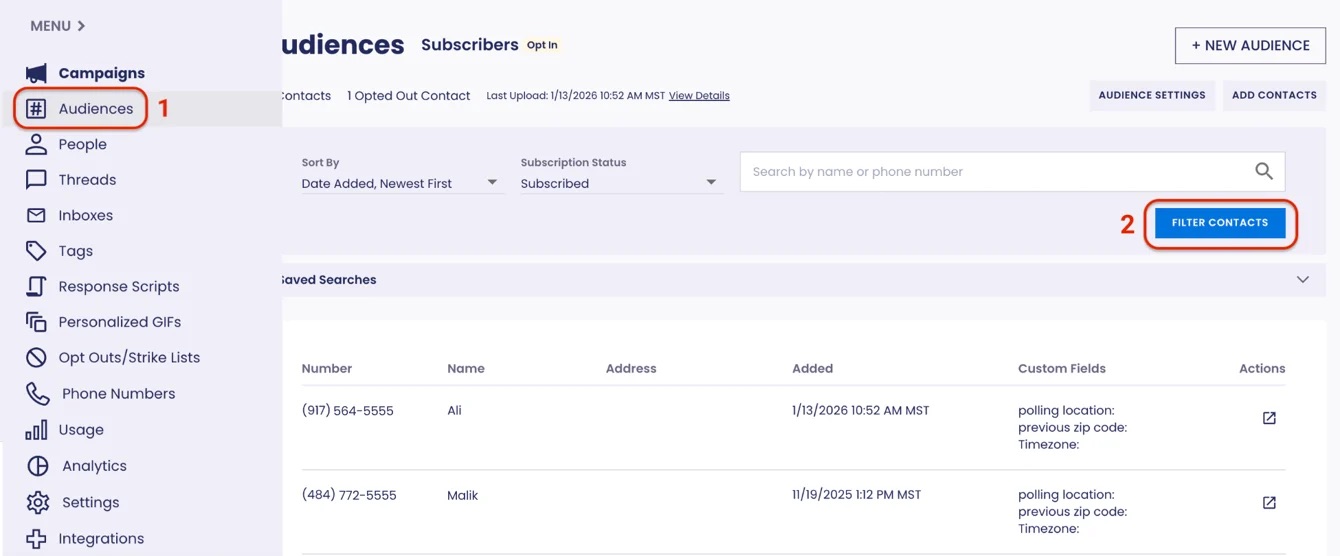
The Audiences feature empowers organizations to build, manage, and message groups of contacts over time, right in Scale to Win Text.
You can also apply filters to your audiences and save those segments (called Saved Searches) to reuse in the future. You can quickly create granular voter and donor contact programs, so you’re only texting your most relevant supporters with targeted messages and maximizing your texting budget. Saved Searches let you message the same audience over time without the hassle of an external CRM or CSVs.
When combined with standard and custom fields, you can filter and search by a slew of criteria, including state, zip code, area code (new!), Donation History, and any custom field you’ve created.
You can also use Audiences to build an opt-in list for a 10-DLC or toll-free number.
Set up: these features are available to all Scale to Win Text accounts. Learn more about Audiences and Saved Searches in our knowledge base.
How does it help you?
Audiences empowers anyone with a Scale to Win Text account to use our in-tool targeting abilities with any long-code or short-code texting program. No matter the program size, with no monthly or upfront costs.
Audiences, when combined with custom fields, create opportunities for hyper-personalized, targeted messaging, whether to voters, volunteers, or donors. Organizations have used Audiences to create targeted lists of:
- Persuadable voters in their district
- Previous campaign donors
- Potential donor prospects
- Super volunteers
- Opt-ed in subscribers
- Contacts by industry for union organizers
For organizers or fundraisers who want to get even more granular with Audiences and custom fields:
- The sky’s the limit with personalized segmentation for fundraising asks when you include Donation History. For example, you could target New York City residents who’ve expressed interest in climate action and donated in the last 6 months with at least three donations of $100 or more
- With custom fields and Audiences, you can track volunteers by shift type (e.g., phonebanking vs. canvassing), the number of shifts completed, and how often they volunteer. Create a saved search of folks most likely to sign up for a phonebanking shift and micro-target them.
- Monitor volunteer progress throughout onboarding by tracking when volunteers complete each stage and identifying when they need to be bumped to the next level. Send the most relevant information to volunteers to reduce confusion and no-shows for shifts.
- Relational organizing groups could use Audiences to track groups of voters over time and send them personalized messages without needing to move data back and forth to a CRM or in spreadsheets
.png)
Opt-in texting with 10-DLC and toll-free numbers
What is it?
You can now build, manage, and send messages to opt-in Audiences on both short and long-code numbers. You can use this feature if you are waiting for a short code approval or if you’d like to run opt-in programs entirely with a 10-DLC or toll-free number.
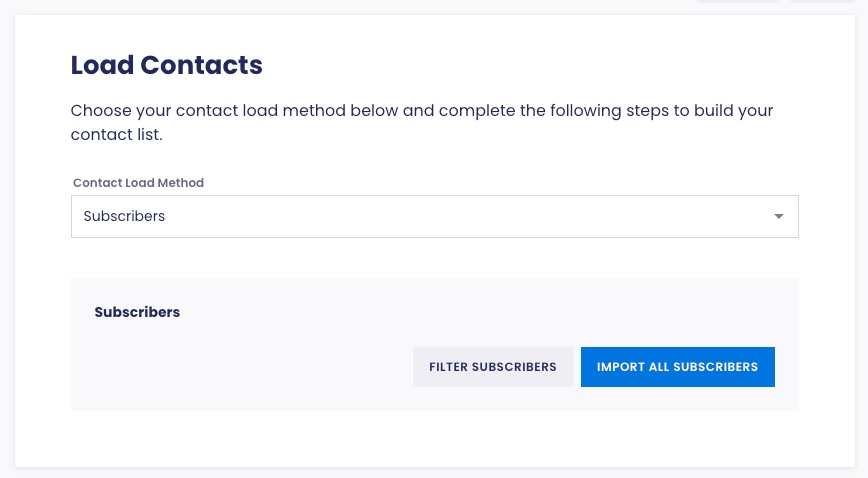
Set up: these features are available to all Scale to Win Text accounts. Learn more about running an opt-in texting program on a 10DLC or toll-free number with our support article.
How does it help you?
- Quickly grow a short-code list: If you are waiting for a short code number to be approved by the phone carriers, you can use this feature to start building your opt-in list right away and keep the momentum going.
- Increased engagement: An opt-in audience is a higher-quality, more engaged group, which builds trust and drives engagement. Because they have consented to receiving messages, you will likely see higher reply rates, click-throughs, and ROI compared to colder lists.
- Affordable access to advanced SMS features: You can now use features typically associated with short codes—without the cost, including integrations with opt-in forms (via ActBlue, ActionKit or API), opt-in management, and automated audience growth.
Advanced reporting features
What is it?
Collect even more granular data and boost your reporting capabilities with structured tags and campaign metadata.
Structured tags
With structured tags, you can now create groups of associated tags (single-select tags) that can be used across campaigns, response scripts, and texter workflows. This new tag type is great for tracking survey responses and understanding voter sentiment over time.
Campaign metadata
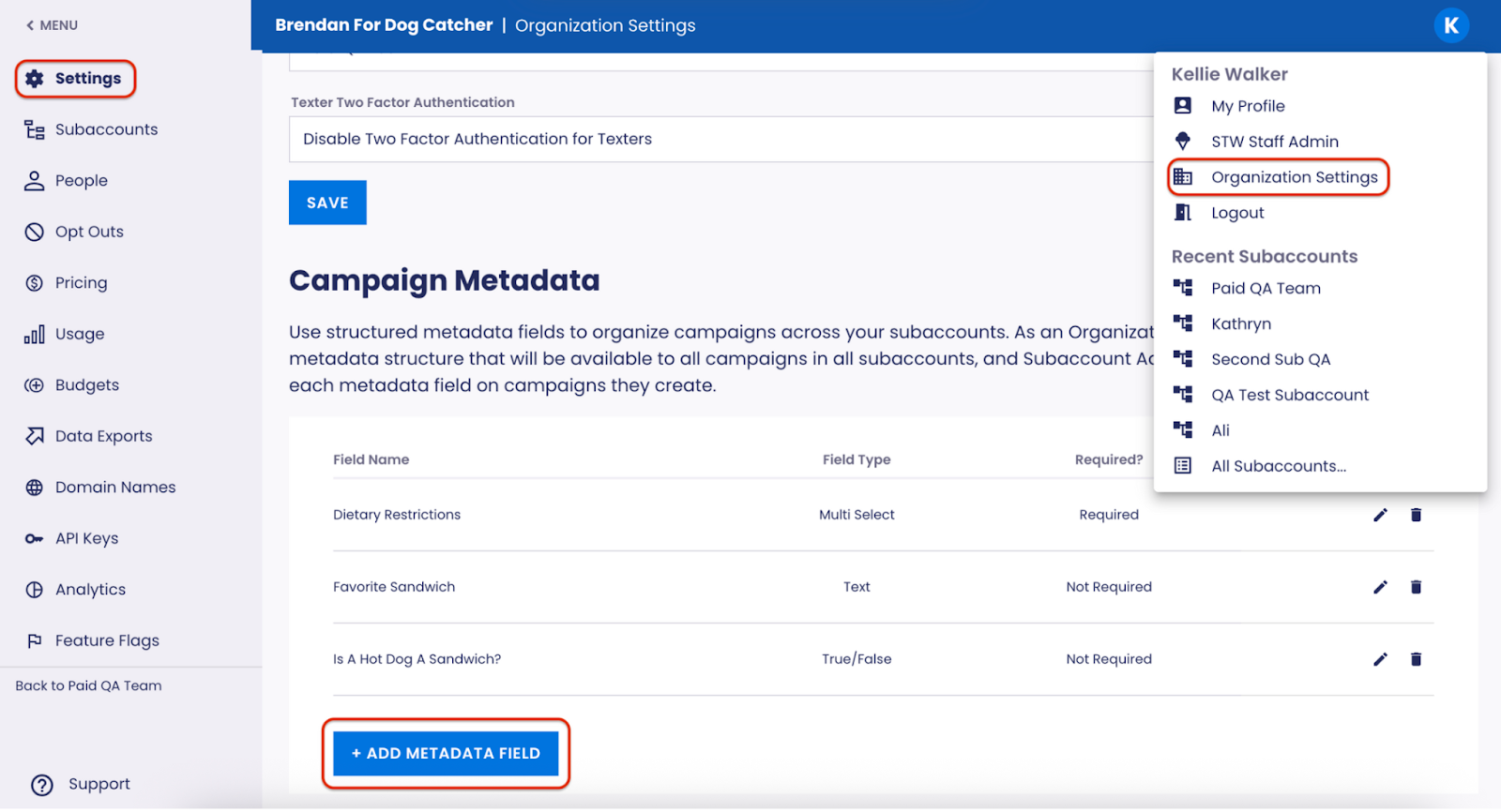
Campaign metadata allows you to define structured fields across subaccounts that can be applied to every campaign for better organization, reporting, and oversight. The fields are customizable by each organization and are visible across campaign creation, management, and exports.
Set up: these features are available to all Scale to Win Text accounts. Learn more about structured tags and campaign metadata in our help articles.
How does it help you?
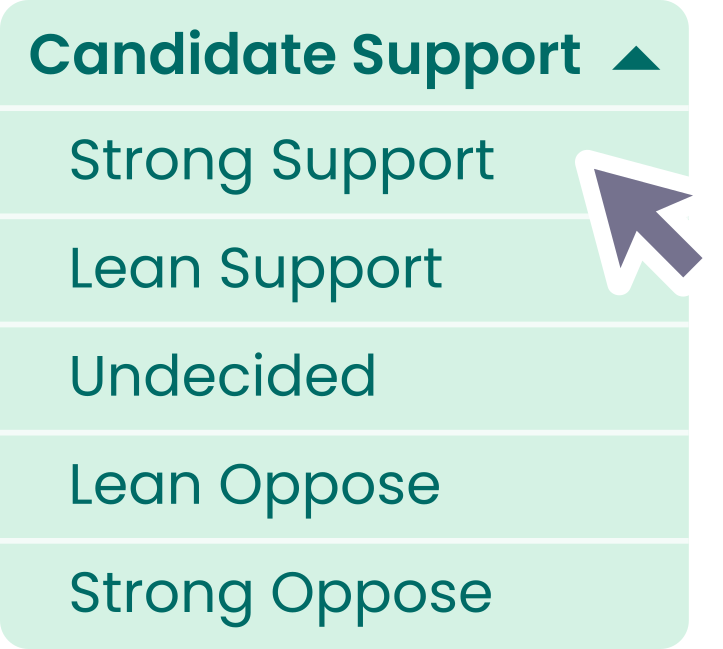
- Structured tagging makes data collection and reporting easier: Set up your campaign for sophisticated data collection and reporting with structured tags. The first tag type we’ve introduced is single-select tags, which let you group related responses together and track them as a single data point. For example, you could track support for a candidate along a continuum with a group called Candidate Support, with responses ranging from 5-Strong Support to 1-Strong Oppose. Another example is a group called Event RSVPs, which could use Yes, No, or Maybe as response options within the same tag group. By grouping related responses under a structured tag, it becomes easier to review and report on your campaign data at the end of your outreach.
- Campaign metadata helps complex teams stay organized: This feature is particularly useful for complex organizations that want to track the same data across multiple subaccounts. You could use campaign metadata to differentiate between campaigns created by your PAC vs nonprofit sides of the organization, or if you work with multiple candidates, you can easily report out on the campaigns for each individual candidate.
Other updates
Click-to-links: Easily ask contacts to take action by including text, calling, and email links in your messages. Common uses of this feature include building an opt-in list via opt-in keywords or asking recipients to contact their representative via email or phone. You can also easily copy and paste click-to-text links for opt-in keywords into initial messages. Find out how to set up click-to-links in our support article.
Toll-free and Campaign Verify tokens: Phone carriers now require a Campaign Verify token and an EIN for political organizations texting on toll-free and short code numbers (as of February 17, 2026). We’ve updated the toll-free and short code application to include fields for both. For more information on this change, check out our recent blog and webinar.
Area code filtering: Create a saved search or target a send based on one or more area codes
Archived campaigns will now be removed from Texter View: Texters will now see a cleaner experience in Scale to Win Text. When you archive a campaign, texters will no longer see it in Texter View, be able to claim replies, send messages, or join the campaign via a texter link.
Set up: these features are available to all Scale to Win Text accounts
